

Discovering a critical email deliverability security flaw often happens when you least expect it: you have spent months building a clean, highly engaged email list for your e-commerce brand. You use a premium Email Service Provider (ESP) like Mailchimp or Klaviyo, your open rates are strong, and your domain authentication (SPF, DKIM, and DMARC) is properly configured. You feel safe.
Then, seemingly overnight, your email deliverability drops to zero.
Your flash sale announcements vanish into the spam folder. Urgent order confirmations and password resets never arrive. Your customer service inbox is flooded with complaints.
You blame your ESP, but the culprit isn’t your email marketing platform. The vulnerability is sitting right inside your website’s PHP application code. Here is the brutal truth about how an unpatched web server can permanently destroy your domain reputation, bypass your email security, and tank your business revenue.
The Myth of the “ESP Shield”
Many online retailers believe that using a third-party ESP isolates their marketing emails from their website’s security. This is a dangerous misconception.
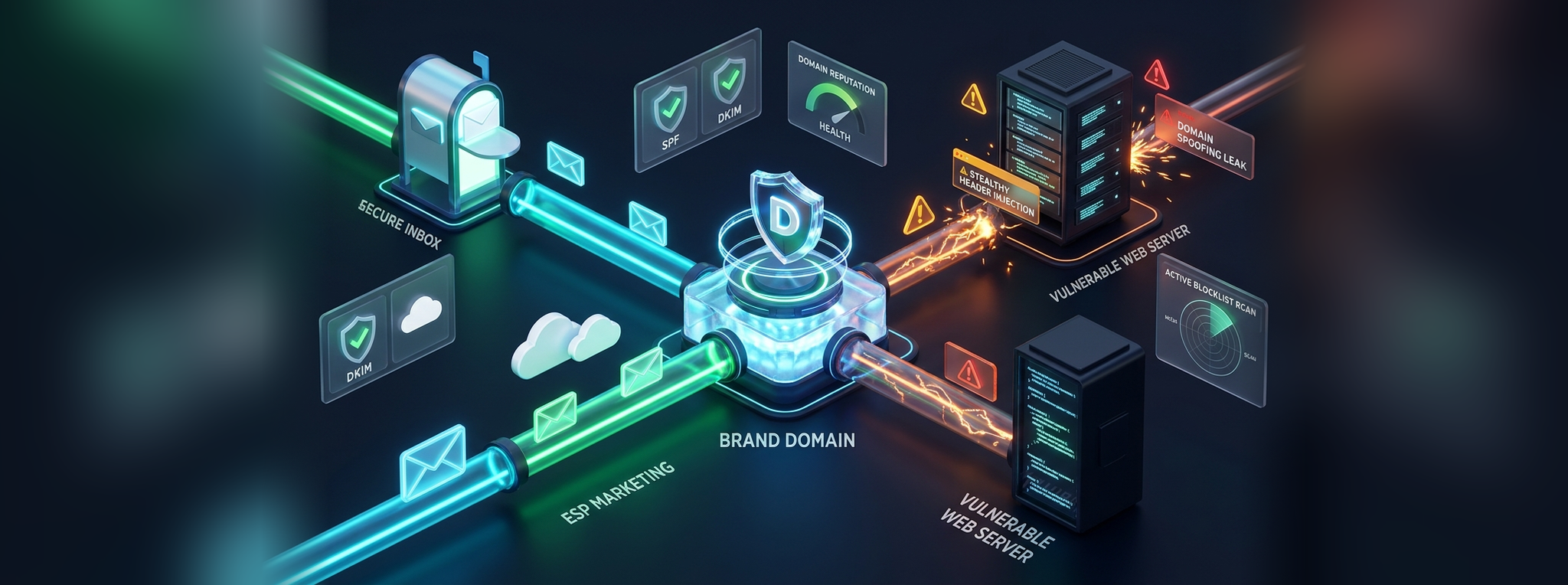
Your email ecosystem has two distinct sending pathways:
[Your Brand's Domain Name]
       │
       ├──► Path A: Your ESP (Klaviyo/Mailchimp) ──► Marketing Newsletters
       │
       └──► Path B: Your PHP Server (WooCommerce/Custom) ──► System & Transactional Notifications
While Path A is securely managed by your marketing team, Path B relies on your web server’s PHP architecture. If an attacker exploits a security flaw in your website (such as an insecure file upload widget, outdated contact form, or an unpatched plugin), they gain control over Path B.
Because both pathways use your exact same domain name, a security failure on Path B will completely destroy the deliverability of Path A. When spam filters see millions of illicit messages signed by your domain, they do not distinguish between your Klaviyo newsletter and your hacked web server—they simply blacklist your entire brand.
The Anatomy of a PHP Mail Hijack: A Costly Email Deliverability Security Flaw
To understand exactly how attackers exploit your code to trigger an email deliverability security flaw, let’s look at what happens behind the scenes in standard web code.
The Vulnerable Code
Below is an example of a typical, poorly written PHP contact form. It directly accepts user input from a web form and drops it straight into the mail() function’s headers without sanitization:
<?php
// DANGER: Completely insecure contact form
if ($_SERVER["REQUEST_METHOD"] == "POST") {
    $visitor_email = $_POST['email']; // User types their email here
    $message = $_POST['message'];

    $to = "orders@pankajkumar.com";
    $subject = "New Customer Inquiry";

    // The vulnerability: Raw concatenation allows header injection
    $headers = "From: " . $visitor_email;

    // If an attacker types "attacker@spam.com\r\nBcc: target1@victim.com, target2@victim.com..."
    // The native mailer interprets the newlines (\r\n) as new email instructions!
    mail($to, $subject, $message, $headers);
}
?>
The Attack Vector (PHP Header Injection)
An attacker sends an automated HTTP POST request to this script. Inside the email field, they inject malicious payload headers:
attacker@spam.com
Bcc: victims@spamlist.com
Subject: Hidden Spam Campaign!
Because PHP’s native mail() function historically relies on newline characters (
) to separate RFC 5322 headers, the server reads this input, assumes it is supposed to blind-copy the attacker’s list, and blasts out unsolicited spam through your server’s MTA.
How to Fix This Email Deliverability Security Flaw (Secure Code Solution)
To patch this email deliverability security flaw, you must explicitly strip out carriage returns and newline characters, validate the email structure, or migrate to a structured library like PHPMailer or a modern transactional API client:
<?php
// SECURE: Sanitised and validated contact form
if ($_SERVER["REQUEST_METHOD"] == "POST") {
    // 1. Sanitize and validate the email address format
    $visitor_email = filter_var($_POST['email'], FILTER_SANITIZE_EMAIL);

    if (!filter_var($visitor_email, FILTER_VALIDATE_EMAIL)) {
        die("Invalid email address provided.");
    }

    // 2. Aggressively strip out any carriage returns or newlines to stop Header Injection
    $visitor_email = str_replace(array("\r", "\n", "%0a", "%0d"), '', $visitor_email);

    $to = "orders@pankajkumar.com";
    $subject = "New Customer Inquiry";

    // 3. Construct headers cleanly using safe parameters
    $headers = [
        'From' => 'website-forms@pankajkumar.com',
        'Reply-To' => $visitor_email,
        'X-Mailer' => 'PHP/' . phpversion()
    ];

    // Using an array for headers ensures PHP handles parameter separation safely
    mail($to, $subject, $message, $headers);
}
?>
3 Ways Attackers Exploit PHP Flaws to Sabotage Your Inbox Placement
Beyond simple header injection, attackers utilize two other common strategies once inside a compromised PHP environment:
- Configuration File Scrapes & API Theft: If a PHP vulnerability allows Remote Code Execution (RCE) or directory traversal, attackers comb through your server’s file tree to inspect
wp-config.phpor.envfiles. They steal your live SMTP credentials or ESP API keys and dispatch spam directly through your premium ESP account, leaving you with a massive bill, a banned account, and ruined domain reputation. - DNS Authentication Poisoning: To guarantee high deliverability through your ESP, you configured SPF, DKIM, and DMARC in your DNS. When an attacker hijacks your server to send spam, those emails are stamped with your official domain. Because your DNS settings confirm that your server or sending IP is an authorized sender, receiving inbox providers (like Gmail and Yahoo) validate the spam as legitimately coming from your brand, destroying your sender trust score in hours.
- Silent Background Mal-Mailer Daemons: Attackers often drop obfuscated PHP web shells (e.g., encoded eval scripts) deep inside
/wp-content/uploads/or hidden cache directories. These scripts act as persistent cron daemons, sending micro-batches of phishing mail that evade basic traffic monitors while slowly eroding your domain placement.
How to Check If Your Domain Has Already Been Blocklisted
If your open rates have suddenly plummeted and you suspect an email deliverability security flaw, use this diagnostic triage sequence to evaluate your sender health:
1. Run a Multi-RBL Check
Real-time Blocklists (RBLs) track known spam-sending IP addresses and domains. Test your infrastructure on our free deliverability tools and external diagnostic lookups:
- MxToolbox Blacklist Lookup: Enter your domain name and your web server’s public IP address to check them against over 100 domain blocklists simultaneously.
- Spamhaus Project: Search your indicators directly in the Spamhaus Lookup tool. If you see your domain on the DBL (Domain Blocklist) or your IP on the XBL (Exploits Blocklist) / SBL, your server has almost certainly been hijacked by automated malware.
2. Verify Your Domain Reputation Directly with Google
Major inbox providers maintain internal reputations that standard public blocklists cannot see. If your messages are missing the inbox across personal Gmail accounts, check Google Postmaster Tools immediately:
- Sign up and verify domain ownership in Google Postmaster Tools.
- Review the Domain Reputation and IP Reputation dashboards. If your dashboard drops from “High” to “Bad,” Google has flagged your sending identity as abusive, systematically routing all of your emails—marketing, transactional, and operational alike—straight to the spam folder.
3. Check for Anomalies in Your Local Mail Logs
If you have SSH access to your server, check the native mail logs to see if your system is trying to send unauthorized background mail. Run the following commands in your terminal to inspect outbound mail queues:
# For Postfix servers
mailq
# For Exim servers
exim -bp
If you see thousands of messages queued to external addresses you do not recognize, your PHP backend is currently compromised and actively leaking unauthorized mail.
How to Protect Your Deliverability Today
Securing your email deliverability requires locking down the code running your website. Protect your sender reputation by taking three immediate actions:
- Deactivate Native PHP Mail: Disable the PHP
mail()function inside your server’sphp.iniconfiguration by settingdisable_functions = mail. Force all transactional website emails to route through a dedicated, authenticated third-party transactional API wrapper (like Postmark, Amazon SES, or Mailgun) using API tokens rather than local SMTP server execution. - Strictly Validate User Inputs: Treat all user inputs as hostile. Implement rigid sanitization and whitelist validation on every web form, especially file upload components. Never allow executable PHP scripts to be saved to public media directories.
- Audit and Encrypt API Storage: Regularly update your plugins, core frameworks, and PHP dependencies to patch known remote code execution vulnerabilities. Where possible, use environment variables outside the public web root to store sensitive API keys.
The Bottom Line from the Deliverability Desk
Email deliverability is not just a marketing metric—it is a direct reflection of your website’s security posture. Even if you pay thousands of dollars a month for enterprise ESPs like Klaviyo or Mailchimp, an unpatched email deliverability security flaw in your web server can ruin your sender reputation in an afternoon.
Keep your PHP applications locked down, audit your outbound mail streams, and follow our operating sequence to improve email deliverability across your entire digital infrastructure.
