

SPF, DKIM, and DMARC are the three core email authentication standards every serious sender should understand. If you have ever asked why some emails land in spam, why mailbox providers distrust a domain, or how brands protect themselves from spoofing, the answer usually starts here. SPF, DKIM, and DMARC help prove who is sending the email, whether the message was altered, and what a mailbox provider should do when checks fail.
This guide explains these authentications in simple language, but it does not stop at basics. You will learn what each standard does, how they work together, what mistakes break them, and how to set them up in a way that actually supports inbox placement.
What SPF, DKIM, and DMARC Mean
SPF, DKIM, and DMARC are email authentication methods that help mailbox providers trust your email.
- SPF checks whether the sending server is allowed to send for your domain.
- DKIM adds a digital signature that helps prove the message was not changed after sending.
- DMARC checks alignment and tells mailbox providers what to do when SPF or DKIM fail.
Each standard solves a different trust problem. SPF checks server authorization. DKIM checks message integrity. DMARC adds policy and brand alignment. Together, these three create a much stronger defense than any one of them alone.
Why SPF, DKIM, and DMARC Matter So Much
Mailbox providers like Gmail, Yahoo, Outlook, and many enterprise filters want proof that an email really belongs to the domain shown in the From address. Without that proof, spoofing becomes easier and sender trust becomes weaker.
That is why these authentications method matter for both security and deliverability. They help reduce domain spoofing, support sender reputation, and improve the signals mailbox providers use when deciding inbox versus spam placement.
Google’s sender guidelines make it clear that proper authentication is now part of the expected baseline for serious senders.
How SPF DKIM DMARC Work Together
The easiest way to understand SPF DKIM DMARC is to follow the email journey.
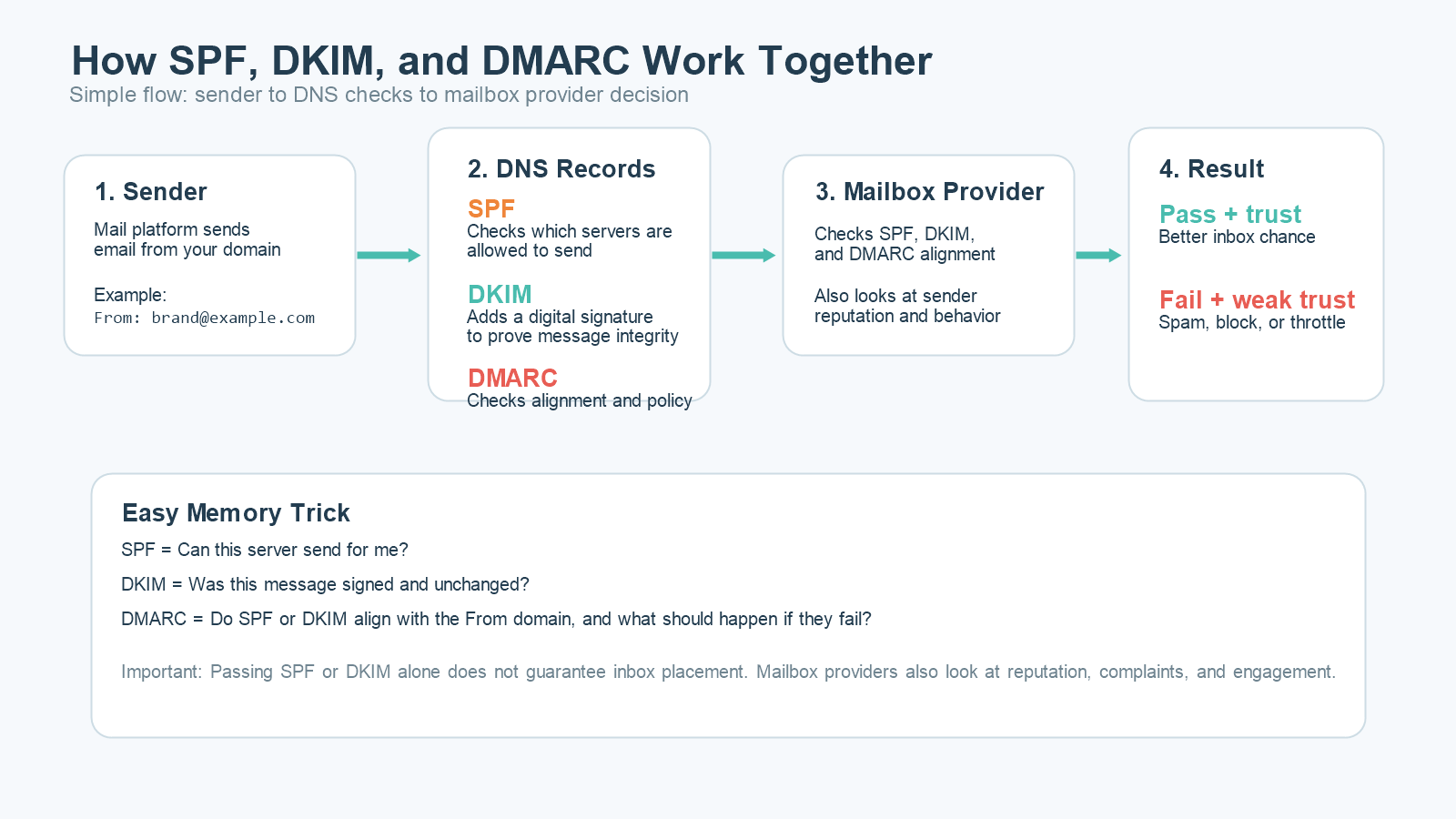
First, your mail server sends the message. The receiving mailbox provider checks whether that server is allowed to send for your domain. That is the SPF step.
Next, the provider checks whether the message carries a valid DKIM signature and whether the signed content still matches the original message.
Then DMARC checks whether SPF or DKIM align with the visible From domain and whether your published policy says to do nothing, quarantine, or reject a failing message.
This is why SPF DKIM DMARC should never be treated as isolated tasks. The real value appears when all three are working together.
What SPF Does
SPF stands for Sender Policy Framework. It is a DNS record that lists which servers or services are allowed to send email for your domain.
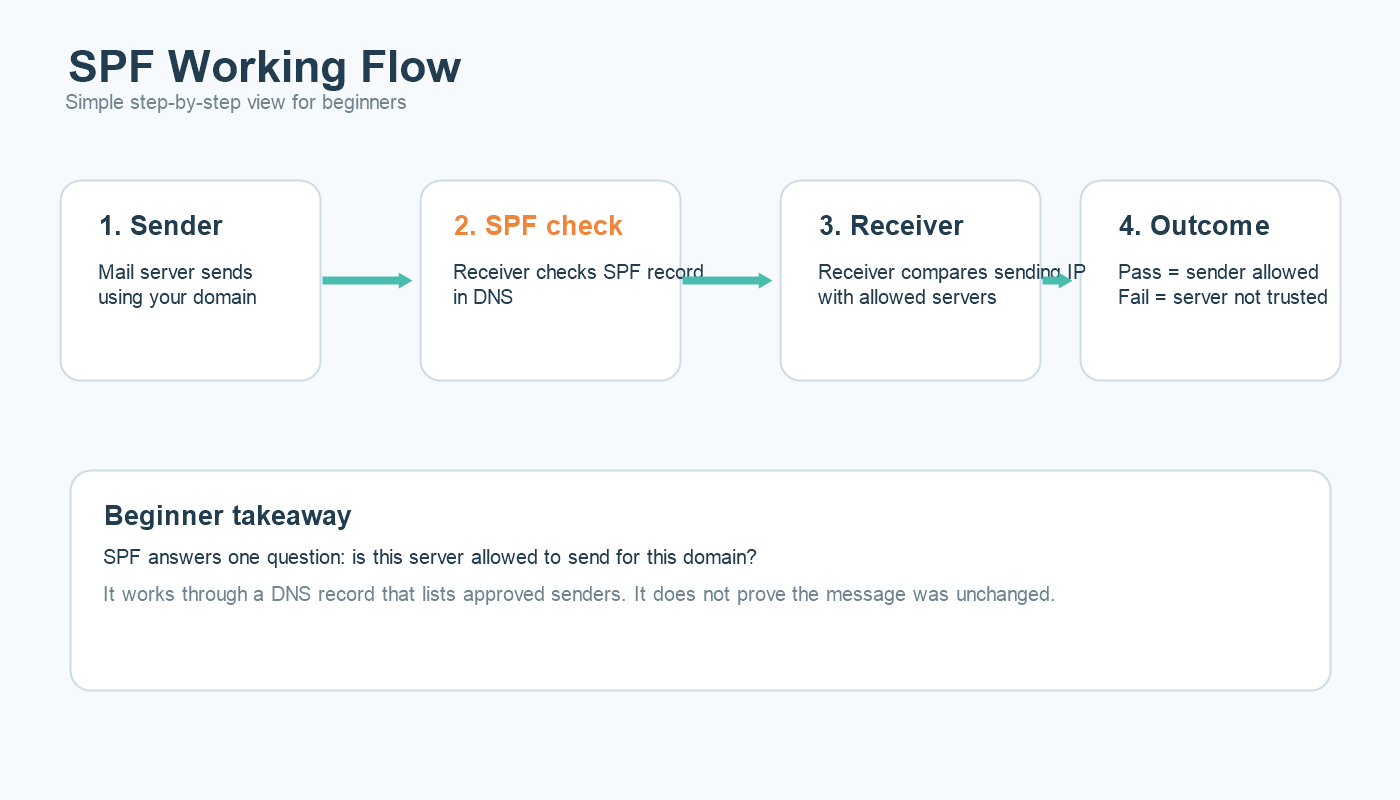
When a mailbox provider receives your email, it looks at the envelope sender domain and checks the SPF record to see whether the sending IP or server is authorized. If the server is not listed, SPF can fail.
That sounds simple, but SPF is often broken by outdated records, too many sending services, or poor DNS management. If your team uses multiple tools such as an ESP, CRM, support platform, and billing system, every authorized sender has to be accounted for correctly.
For a deeper technical breakdown, see this full guide on SPF.
What DKIM Does
DKIM stands for DomainKeys Identified Mail. It adds a cryptographic signature to the email header. That signature is validated using a public key published in DNS.
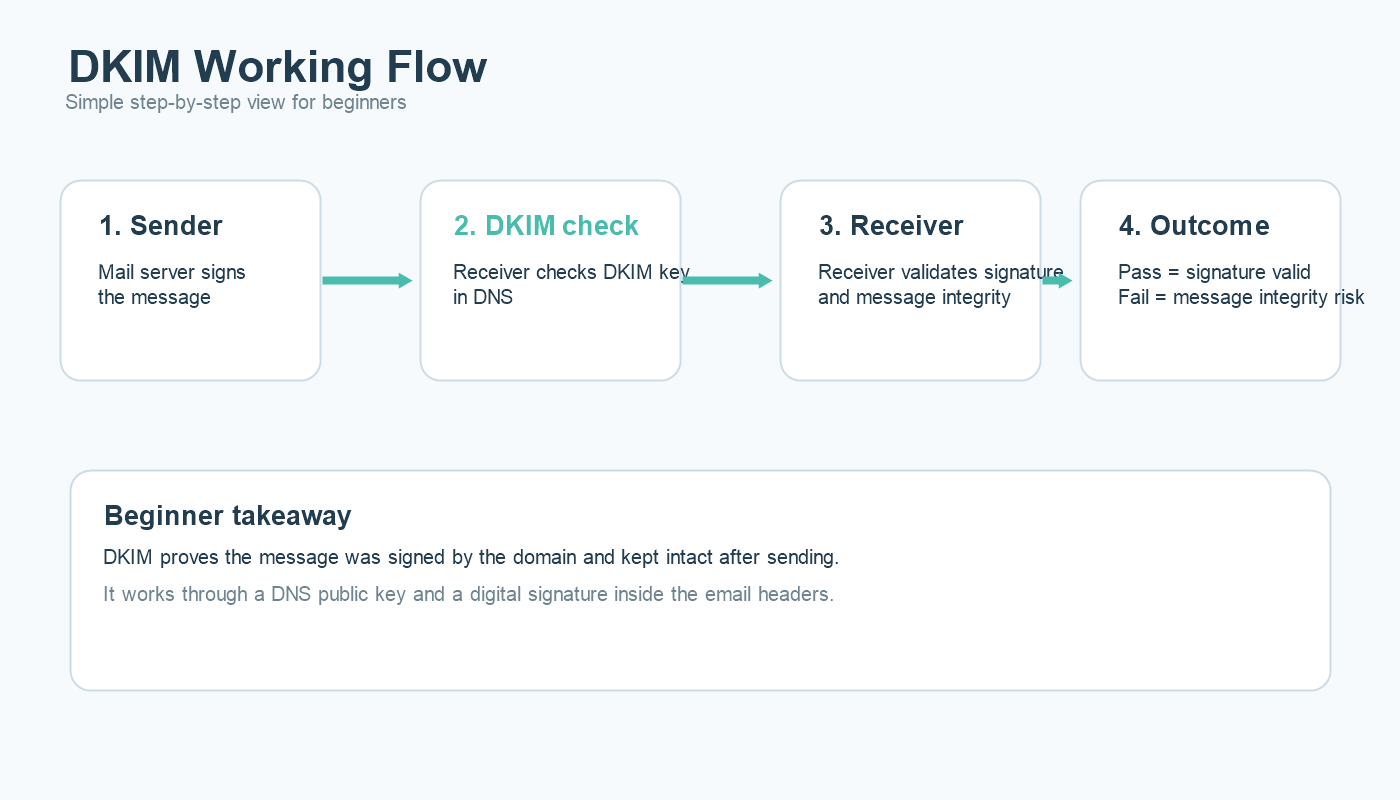
The purpose of DKIM is not to prove that the sending server is allowed. The purpose is to prove that the message was signed by the domain and that the signed parts of the message were not changed after sending.
That makes DKIM especially useful for message integrity and long-term domain trust. If the signature breaks, the receiving server knows something went wrong or the message was modified.
If you want the deeper technical version, this article explains DKIM in more detail.
What DMARC Does
DMARC stands for Domain-based Message Authentication, Reporting, and Conformance. It builds on SPF and DKIM by adding alignment and policy.
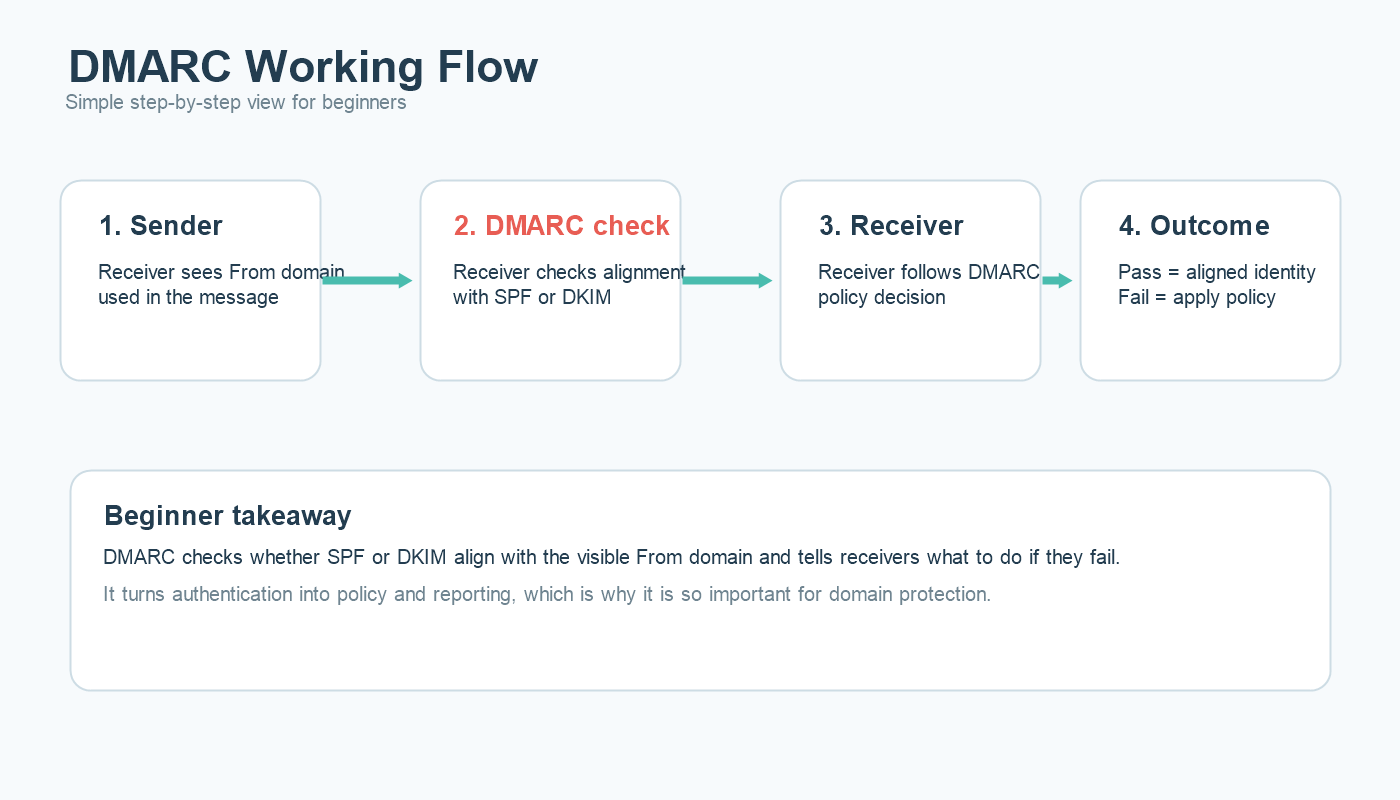
Alignment is the key concept. DMARC checks whether the domain that passed SPF or DKIM actually matches the visible From domain that the recipient sees. This is what helps stop direct-domain spoofing.
DMARC also tells mailbox providers what to do if the checks fail. A DMARC record can use:
p=noneto monitor onlyp=quarantineto suggest spam placementp=rejectto ask receivers to reject the message
That is why DMARC is often the bridge between basic authentication and real brand protection. For the full walkthrough, here is the dedicated DMARC guide.
Example in Simple Terms
Imagine your company sends an email from brand@example.com.
- SPF asks: is this server allowed to send for
example.com? - DKIM asks: was this email signed by
example.comand kept intact? - DMARC asks: do those authentication results align with the visible From domain, and what should we do if they do not?
When all the authentication work well, the mailbox provider gets a much stronger trust picture. That still does not guarantee the inbox, because reputation and engagement matter too, but it removes a major trust barrier.
Common Mistakes
Forgetting Secondary Sending Tools
One of the most common mistakes is configuring the main ESP correctly while ignoring support tools, CRMs, finance systems, or internal platforms that also send on behalf of the domain.
Using SPF Alone
SPF by itself is not enough because forwarding and alignment issues can weaken its value. SPF, DKIM, and DMARC work best together, not as substitutes for each other.
Publishing DMARC but Ignoring Reports
Many teams publish a DMARC record and never look at the reporting data. That misses one of DMARC’s biggest advantages: visibility into who is sending using your domain.
Breaking DKIM During Platform Changes
Migrations, DNS edits, and expired selectors can quietly break DKIM. If no one checks after the change, the issue can stay hidden while trust declines.
Confusing Authentication with Deliverability
Even perfect SPF, DKIM, and DMARC cannot save bad list quality, high complaints, or low engagement. Authentication supports trust, but reputation still decides a lot. If your inbox placement remains weak, compare your setup with this guide on how to improve email deliverability.
How to Set Up These Step-by-Step
1. Inventory every sender. List every platform, service, and server that sends using your domain.
2. Publish SPF carefully. Make sure the record includes all real senders and remove anything no longer in use.
3. Enable DKIM for each sending platform. Add selectors and verify signatures are passing after setup.
4. Publish a DMARC monitoring policy. Start with p=none if you need visibility before enforcement.
5. Review DMARC reports. Identify legitimate and unauthorized senders, then fix alignment gaps.
6. Move toward stronger enforcement. Once legitimate traffic is aligned, consider quarantine or reject.
7. Re-check after every infrastructure change. New tools, DNS edits, domain migrations, and ESP changes can all break authentication quietly.
How It Helps Deliverability
SPF, DKIM, and DMARC help deliverability by removing uncertainty. Mailbox providers do not have to guess whether your domain is real or whether the message is consistent with your brand identity. That improves trust.
But trust is layered. After authentication, mailbox providers still look at your complaint rates, engagement, volume stability, and list quality. That is why these authentications are best seen as the foundation, not the full house.
When All Authentications Are Working, but the Inbox Is Still Weak
If your authentication passes and your inbox placement is still weak, the problem usually sits elsewhere. Common causes include stale lists, broad untargeted campaigns, poor sender reputation, or complaint-heavy segments.
This is also where a clean email list and better segmentation begin to matter more than DNS itself. Authentication opens the door to trust. Engagement helps keep it open.
FAQs
Do I need all three: SPF, DKIM, and DMARC?
Yes. SPF, DKIM, and DMARC each solve a different trust problem, and modern mailbox providers expect a complete authentication setup.
Can SPF, DKIM, and DMARC guarantee inbox placement?
No. They support inbox trust, but reputation, list quality, complaints, and engagement still affect where your email lands.
What is the best DMARC policy to start with?
Most teams start with p=none so they can review reports and fix legitimate sender issues before moving to stronger enforcement.
Can DKIM pass if SPF fails?
Yes. SPF and DKIM are separate checks. DMARC can still pass if one of them passes and aligns correctly with the visible From domain.
Final Thoughts
SPF, DKIM, and DMARC are not optional extras anymore. They are the core language of email trust. If you understand how they work, you can troubleshoot faster, protect your domain better, and build a stronger foundation for inbox placement.
Start with the basics, publish carefully, review your reports, and treat authentication as a living system instead of a one-time setup task. That is how SPF, DKIM, and DMARC become a real advantage instead of just three technical acronyms in DNS.
You may use our Free Deliverability Tools for DNS record lookup or Spam testing
