

Gmail’s updated unsubscribe and report spam experience matters more than it first appears. On the surface, it looks like a small interface change. In practice, it changes how users send feedback, how senders should think about unsubscribe friction, and how complaint signals can affect future inbox placement. This guide explains about Gmail Report Spam and Unsubscribe Update, and why the separation between report spam and unsubscribe matters, and what email senders should do in response.
What Gmail Changed
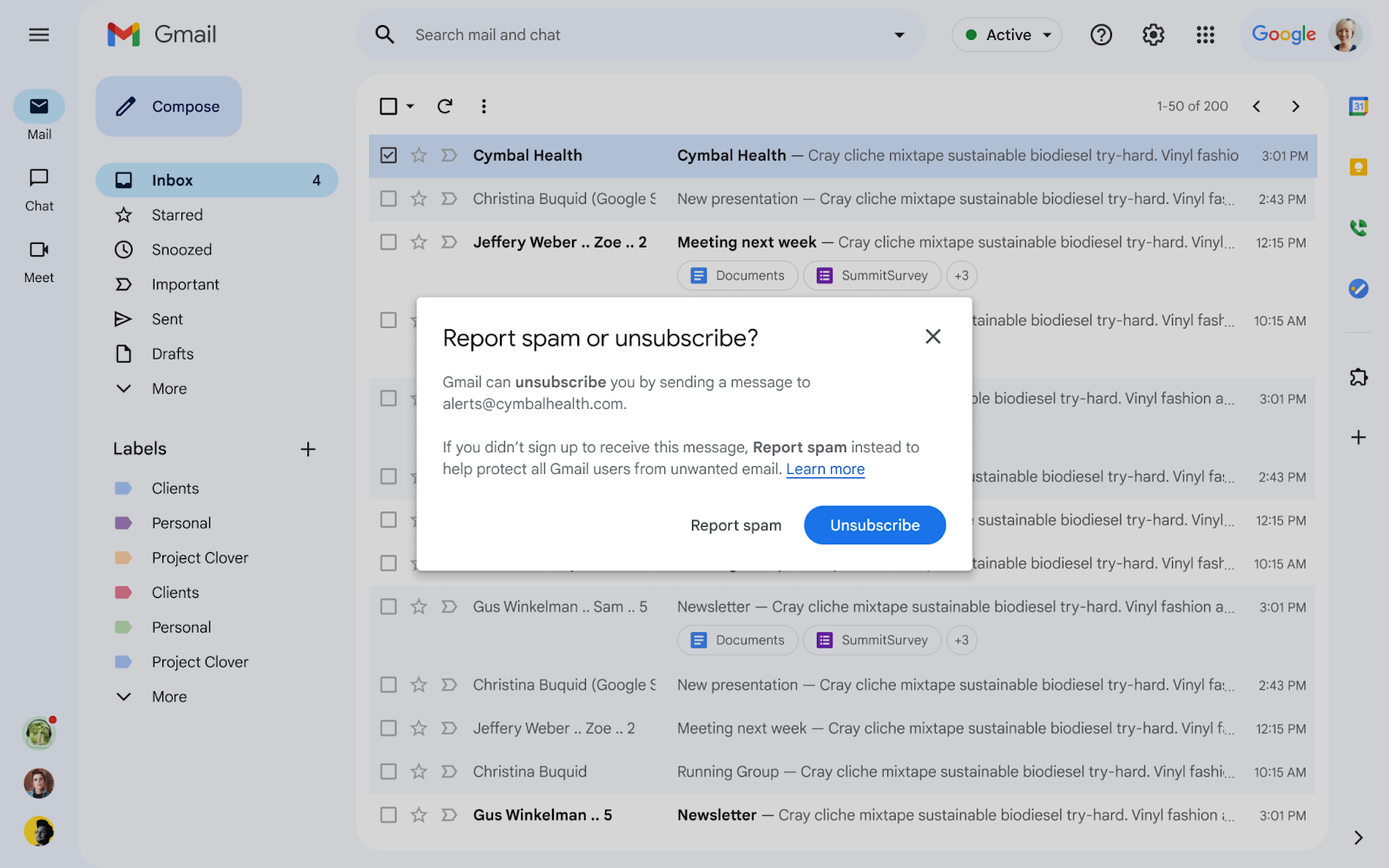
Gmail improved the visibility of the unsubscribe option and separated it more clearly from the report spam action. That distinction matters because not every unwanted email is spam. Some messages come from legitimate senders the user no longer wants to hear from. Gmail wants that feedback routed correctly.
This is a better experience for users, but it also creates a stronger expectation for senders. If your unsubscribe path is weak, hidden, or confusing, you are more likely to earn spam complaints instead of clean opt-outs.
Google’s official update note explains the product change from Gmail’s side and is worth reading alongside your deliverability review.
Why the Report Spam and Unsubscribe Split Matters
For years, some users treated spam and unsubscribe as the same action. That created confusing feedback loops for mailbox providers and unnecessary reputation damage for legitimate brands. By separating the two actions more clearly, Gmail helps users express intent more accurately.
For senders, this means one thing: make opting out easy. The easier it is to unsubscribe, the less likely users are to send a stronger negative signal through the spam button.
What This Means for Email Senders
Unsubscribe experience is now part of deliverability strategy. If users struggle to leave, your complaint risk rises. That affects sender reputation, and sender reputation affects inbox placement.
List hygiene matters even more. If you keep sending to people who lost interest long ago, they may ignore you for a while, but eventually some will use the spam option instead of searching for the unsubscribe link.
Relevance still drives everything. Gmail can improve interface clarity, but only the sender can improve message relevance, cadence, and audience quality.
How to Adapt to Gmail’s Unsubscribe Update
1. Make unsubscribe obvious. Do not hide it in tiny footer text or force users through confusing extra steps.
2. Support list-unsubscribe headers. This helps mailbox providers surface unsubscribe actions more cleanly in the interface.
3. Honor requests quickly. Slow processing creates frustration and increases complaint risk.
4. Reduce sends to inactive users. This is where a clean email list protects your program.
5. Review complaint spikes by campaign type. If certain streams consistently earn negative feedback, the problem may be content mismatch, audience mismatch, or cadence.
6. Align with the Gmail and Yahoo sender requirements. This update fits into the broader push toward easy unsubscribe, authentication, and complaint control. If you have not reviewed that full framework yet, start with these Gmail and Yahoo sender requirements.
Common Mistakes Marketers Make After This Update
- Assuming better Gmail UI will solve poor list quality
- Keeping unsubscribe links technically present but practically hidden
- Ignoring inactive subscribers for too long
- Watching open rates while missing complaint trends
- Mixing promotional and transactional intent too casually
If your campaigns are already missing the inbox, compare this issue against common reasons email stops reaching the inbox. Gmail UI changes often expose older deliverability weaknesses rather than create them.
Why This Update Is Good for Responsible Senders
Responsible senders benefit when mailbox providers distinguish spam from normal opt-out behavior. If your program respects user choice and keeps content relevant, clearer unsubscribe paths should reduce unnecessary spam complaints over time.
That is good for subscribers, good for trusted brands, and good for long-term deliverability.
FAQs
Why did the Gmail Report Spam and Unsubscribe Update happen?
Gmail wants users to give more accurate feedback. Unwanted mail from a legitimate sender should often lead to unsubscribe, while actual abusive or deceptive mail should be reported as spam.
Does this change affect email deliverability?
Yes. It affects how negative feedback is generated and interpreted. If unsubscribe is easy, complaint risk can drop. If your program is hard to leave, complaint risk stays high.
Should senders change anything now?
Yes. Review list-unsubscribe support, unsubscribe speed, list hygiene, and complaint trends. The update rewards sender programs that already respect subscriber intent.
Final Thoughts
Gmail’s unsubscribe and report spam update is a user-interface change with real deliverability consequences. It gives subscribers a clearer choice, but it also places more pressure on senders to earn trust through clean list management and easier opt-outs.
If your email program still depends on friction to keep list size high, this update is a warning. Better unsubscribe behavior usually leads to better sender reputation, and better sender reputation leads to better inbox placement.
